iBots are intelligence agents or Bots. These agents are triggered by a schedule or condition that in turn generates a request to perform analytics on data based upon defined criteria.
Where do iBots originate from?
Oracle BI Delivers is the application to create, modify and manage iBots.
How do iBots work?
In order to understand how an iBot works, we should start by first creating a new iBot from scratch.
Navigate to "Delivers" ......

.....and click the link to create a new iBot.

From here, we will tackle each individual tab to get an understanding of what the process is to create an iBot.
1) Overview tab

This view is a summary of the current settings for the selected iBot.
One can navigate to specific settings by clicking on the links in the summary or clicking on the tabs located at the top.
2) General tab

This is where the priority of the iBot and how to send the delivery content are set.
The priority options are low, normal, or high. The priority works with the delivery profile for a user to determine the destination for alerts of different priorities.
The following Data Visibility options affect the customization of the delivery content:
Personalized (individual data visibility):
- uses the data visibility of each recipient to customize iBot delivery content for each recipient. Note that The Run As field if not available.
Not personalized (use the Run As user's data visibility):
- sends the iBot's delivery content to the specified recipients. All users receive the same content as if they were the user specified in the Run As field.
Not personalized (use iBot owner’s data visibility):
- sends the iBot’s delivery content to the specified recipients using the data visibility of the specified user (Run As box field) who created the iBot. In other words, all recipients will receive the content that's viewable to the Run As user.
3) Conditional Request tab

This page is used to select a request to trigger the iBot. The results of the conditional request determine whether the iBot sends its delivery content and initiates any subsequent actions:
- If the request does not return any rows, the iBot is not triggered.
- If the request returns at least one row, the iBot sends its delivery content and initiates any subsequent actions.
Requests can be chained together to create complex conditional logic.
4) Schedule tab

iBots can be executed based on a specified schedule. You can define a starting date and time for the iBot, a recurrence schedule, and an ending date.
5) Recipients tab

Use this tab to select the users and groups to receive the delivery content of the iBot.
One has the ability to select specific individual users and groups to receive the contents of the iBot.
**You can select multiple users by holding down the SHIFT or CTRL keys and selecting adjacent or nonadjacent users.**
Also, one can select which users or groups can subscribe to the iBot. This allows users the flexibility to receive and view the contents of the iBot AND customize prompted filter values for columns.
Keep in mind that in order to publish iBots, the content must be shared.
6) Delivery Content tab

Use the Delivery Content tab to specify the type of content to deliver with the iBot, such as a
dashboard page or a saved request. The delivery format for the content can also be selected, such
as HTML, PDF, XLS, CSV, or text.
The contents of the Headline field will appear as the subject of the request.
The two field text boxes below allows one to attach a message when the iBot is delivered depending on if the iBot is delivered as an attachment or if there are no records returned by the conditional request.
7) Destinations tab

The User Destinations and Specific Devices portions of this tab are pretty self explanatory.
As for System Services...
Oracle BI Server Cache is used for seeding cache.
(** To have the cache created for individual users, the Personalized option for data visibility in the General tab must be selected.)
Disconnected Application Cache is only available to companies that have licensed Disconnected Analytics.
(** To have the disconnected application cache created for individual users, the Personalized(individual data visibility) option for Data Visibility in the General tab must be selected.)
(**Nonpersonalized data is not used for Disconnected Analytics users.)
8) Advanced tab

Use the Advanced tab to specify one or more actions to execute after the iBot is finished running.
Actions include the execution of other iBots, custom scripts, custom Java programs or Workflows.
For further reading on iBots, I would suggest downloading the Oracle Business Intelligence Answers, Delivers, and Interactive Dashboards User Guide to read further about creating iBots. What I provided is just a brief glimpse of iBots.
(http://download.oracle.com/docs/cd/B40078_02/doc/bi.1013/b31767.pdf) ¶ 7:19 AM 0 Comments


Most of the times not much thought is given to defining connection pools while developing rpd. Improperly defined connection pool would affect the OBIEE performance and user experience. Here are some of the things to consider while defining connection pool.
- Change the default maximum connections. The default is 10. Based on your system usage change the value that is more realistic to your system usage
- Create a separate connection pool for execution of session variables
- Create a separate connection pool for the execution of aggregate persistence wizard. Remember that you need to give the schema user owner credentials for this connection pool as the wizard creates and drops tables
- If need be create a separate connection pool for VVIPs. You can control who gets to use the connection pool based on the connection pool permissions.
Authentication vs. Authorization
Commonly asked question – What is the difference between authentication and authorization? Authentication is the process in which a user id and password is verified to see if the user is a valid user. The process can be compared to logging on to your email or even your laptop. Once the user logs on, authorization takes care of what components or data a user can have access to. To read about OBIEE Authentication click here.
Setting up framework for Authorization
Authorization is most commonly handled by using an external table. The following steps are required after setting up Authentication process:
- Create a table in the database that would have the Authorization information. If you already have a table from which associates the UserID/Username with Groups, you can use that table. If not, create the following table in your database.
CREATE TABLE WC_USER_AUTH
(
LOGON VARCHAR2(120 BYTE) NOT NULL,
GROUP_NAME VARCHAR2(120 BYTE) NOT NULL,
CREATED_DT DATE DEFAULT SYSDATE
)
TABLESPACE
PCTUSED 0
PCTFREE 10
INITRANS 1
MAXTRANS 255
STORAGE (
INITIAL 64K
MINEXTENTS 1
MAXEXTENTS 2147483645
PCTINCREASE 0
BUFFER_POOL DEFAULT
)
LOGGING
NOCOMPRESS
NOCACHE
NOPARALLEL
MONITORING;
CREATE UNIQUE INDEX NDX_LOGON_GROUP ON WC_USER_AUTH
(LOGON, GROUP_NAME)
NOLOGGING
TABLESPACE
PCTFREE 10
INITRANS 2
MAXTRANS 255
STORAGE (
INITIAL 64K
MINEXTENTS 1
MAXEXTENTS 2147483645
PCTINCREASE 0
BUFFER_POOL DEFAULT
)
NOPARALLEL;
- Now you will have to populate the table with the relevant information. Note that one user can belong to more than one group.
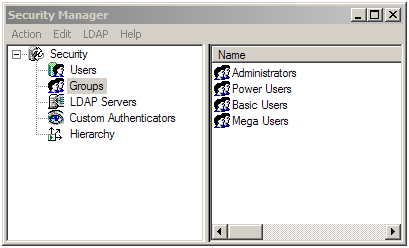
- Next, you need to create the groups in the repository. The name of the groups should be as they are in the table, if you want these groups to drive web and data security as well. If you have a group called “Power Users” in the table, you would have to create a group with the exact same name.
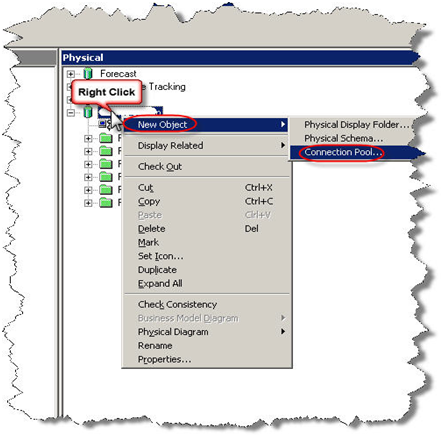
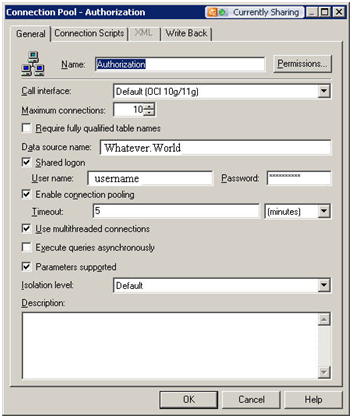
- As a best practice, it is recommended that a separate connection pool is created for the execution of Authentication and Authorization Initialization blocks.
- Now create a session initialization block that would read from the table to assign groups to the user.
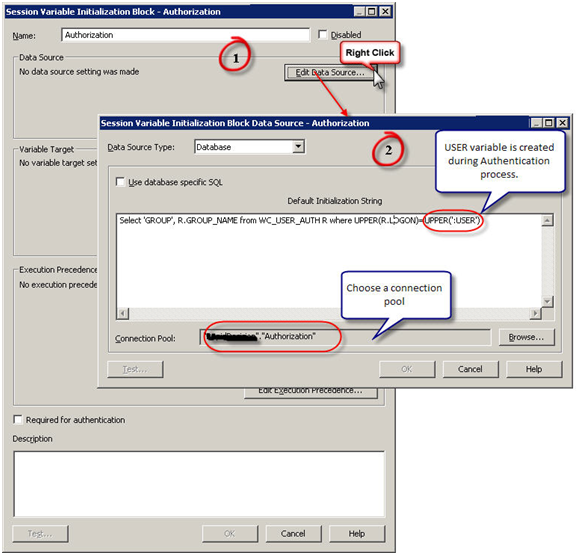
- Configure the session initialization block. Give it a name and click on Edit Data Source. In the pop up window, choose Database from the drop down box. Write a SQL statement that would get all the group names of the user that is populated in the USER variable as part of Authentication. The SQL statement used in this example is SELECT ‘GROUP’, R.GROUP_NAME FROM WC_USER_AUTH R WHERE UPPER(R.LOGON)=UPPER(‘:USER’). Choose a connection pool.
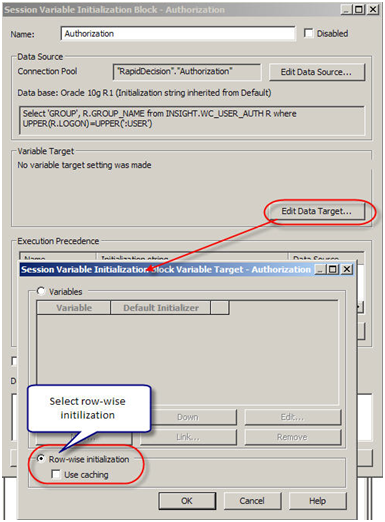
- Now edit the variable target and set it to row wise initialization. What it really means is, it would assign multiple values to a variable, GROUP variable in this case. If a user belongs o multiple groups, multiple rows will be returned by the SQL and this setting would enable GROUP to contain all the values.
- Now set execution precedence. The authorization process takes place after authentication process. We are using a variable (USER) that authentication process is populating.
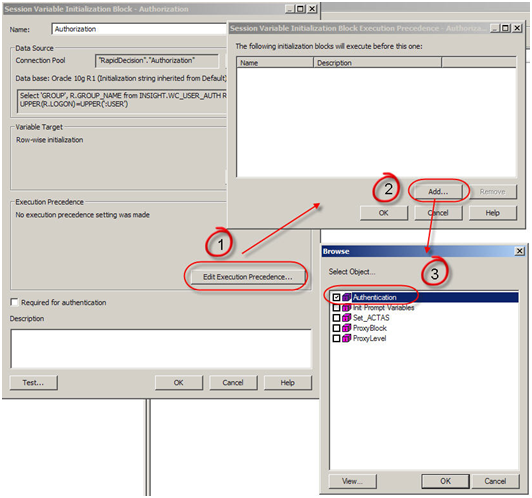
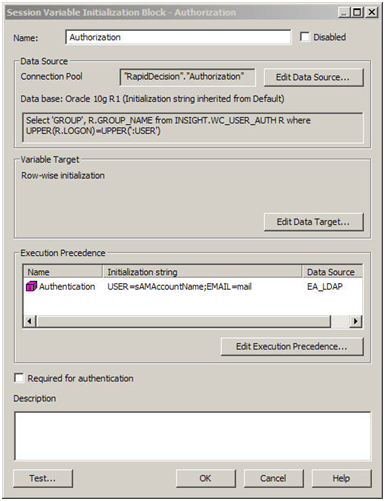
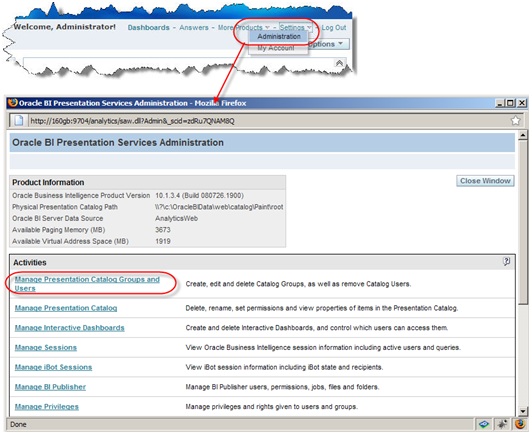
- Now create the Catalog Groups in the presentation services. The group names should match the group names from the table and the repository as in Step 3, if you want them to drive the web and data security.
Go to Settings -> Manage Presentation Catalog Groups and Users
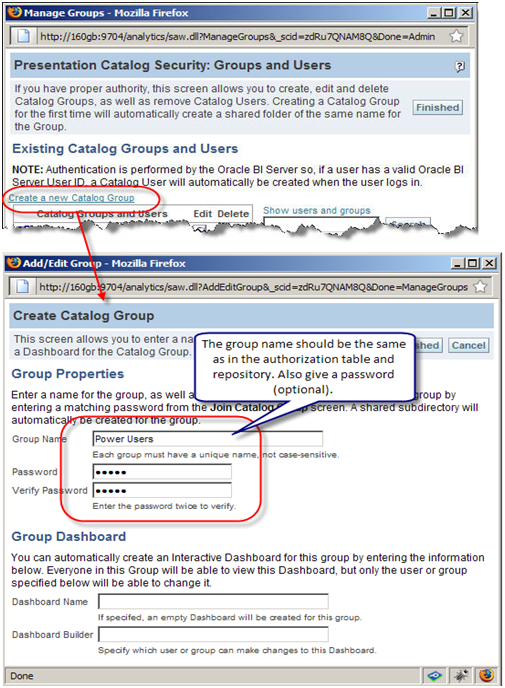
- Click on Create a new Catalog Group. In the new window give the name of the group and as a best practice give it a password.
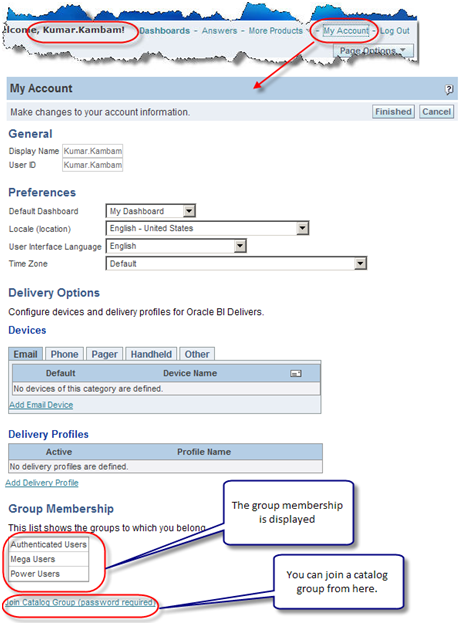
- Now when logged I will log in as Kumar Kambam and click on My Account, in here we can see the Kumar.Kambam ‘s group membership. You can join a Catalog Group from here.
- Now that we have established that Power Users group has at least one user as demonstrated in the Step 12, let us log in as Administrator and go to Power Users Group properties. Don’t panic if you see the message saying “There are currently no members in this Group”. Group assignment to a user is done at session level. When a user logs on and authorization process assigns groups to users. This assignment of users to a group is valid for that session only. Thus no group membership information is stored in the presentation services.
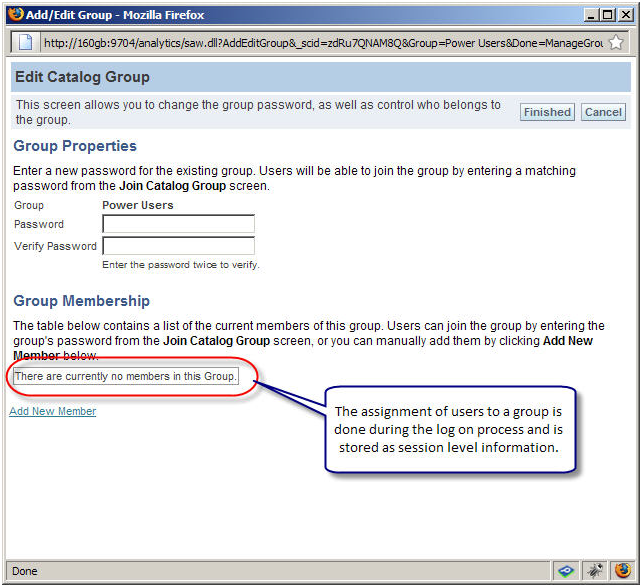
- One can also create catalog groups in the presentation services and assign users manually, however it is not recommended to do so.
- One frequently asked question is – Why cannot I see the comprehensive list of users and their group memberships in the presentation services?
In this set up, presentation services cannot be used to maintain or see the comprehensive list of users. A user will appear only after he/she logs on for the firstime. As far as group assigment goes, it is done on the session level and is valid for that session only. So we cannot see the group membership information. Though you can create a catalog group on the presentation services and assign users manually, it not recommended to do so.
Points to ponder
- Authentication and Authorization are two different processes accomplishing different tasks.
- Authentication checks valid user and password
- Authorization assigns security group membership
- Authorization process is executed after authentication process
- If you want to control data and web security with the groups defined in the table, the name of the group should be the same in all the three places – table, repository, and presentation services
- The assignment of a user to a group in this case is done at session level and that information is not stored in the presentation services. Though you can create a catalog group on the presentation services and assign users manually, it not recommended doing so.
OBIEE and Virtual Private Database (VPD)
What is VPD?
Virtual Private Database is Oracle’s fine grain access control (FGAC) feature that was introduced in Oracle 8i. It helps control data level security on the database side by applying policies, thus data level security in the applications that read from the database is not necessary. The advantage is that if there are multiple applications accessing data from a database, it is not necessary to implement data level security in all those applications.
How does VPD work?
Policies are created in the database that would append a predicate (a WHERE clause) to the query in runtime. Consider a simple example – there exists a policy which would return only the rows attached to a particular user id on the table Orders. If a user “Kumar” were to query data from Orders table, Kumar would enter the following command:
Select * from Orders;
The policy that dictates what information a user can see would append a predicate to the query as follows:
Select * from Orders
where user_name = ‘KUMAR’;
This mechanism of appending the predicate is entirely transparent to the user.
Click here to read more about VPD on Oracle’s OTN.
Configuring VPD in OBIEE
To use the VPD feature in the Database and OBIEE along with its caching capabilities it is important to configure VPD in OBIEE. Failing to configure VPD in OBIEE while caching is enabled (in OBIEE), the request would bypass VPD policies by accessing data from cache and data level security will not be effectively handled by the database’s VPD. Thus, the users will see incorrect results.
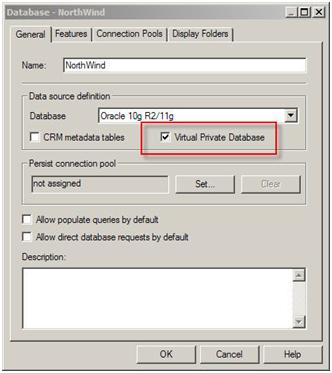
To configure VPD in OBIEE, first enable the VPD option in the database’s general tab as shown:
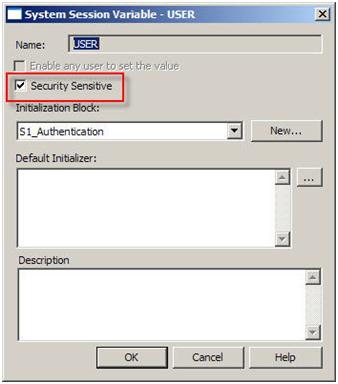
Then enable the “Security Sensitive” option in the security variable:
Normal OBIEE Cache Behavior
To be simple and brief, if caching is enabled, a query that is being run for the first time would create a cache. Subsequent requests that is similar to the query or its subset would hit the cache to retrieve the results. This is true even if the users are different.
Example:
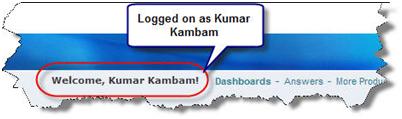
Logged on as Kumar Kambam
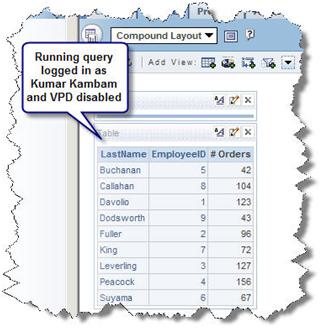
Running a request…
… generates the following Query log
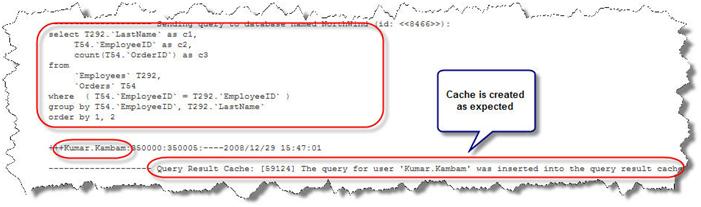
The cache is created….

Now any user that issues a similar request or a subset of the request will hit the cache.
Logged on as Power User1

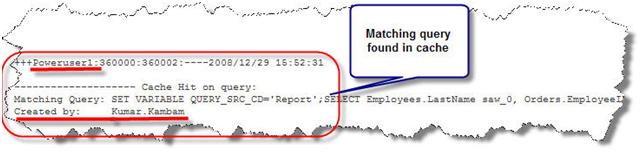
Running a similar request, generates the following log. Notice that OBIEE server found a matching query in the cache that is created by Kumar.Kambam for the query issued by Poweruser1.
OBIEE Cache Behavior with VPD configured
When VPD option is configured in OBIEE, cache is created for each user even though a matching query exists in the cache. This ensures that the data retrieved for a user is not retrieved from the cache created by a different user, thereby ensuring the enforcement of VPD policies. In other words, if Kumar.Kambam were to run a query, the cache is created by the data visibility rules enforced by the VPD for Kumar.Kambam. If Poweruser1 runs a similar request it should bypass the query cache and hit the database to retrieve the data along the policies of the VPD for Poweruser1; if it were to hit the cache created by Kumar.Kambam, the results for Kumar Kambam will be presented to Poweruser1.
After configuring VPD, logged on as Kumar Kambam
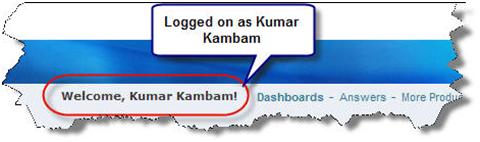
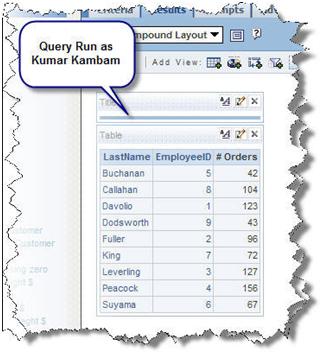
Running a query for the first time…
…the following log is generated
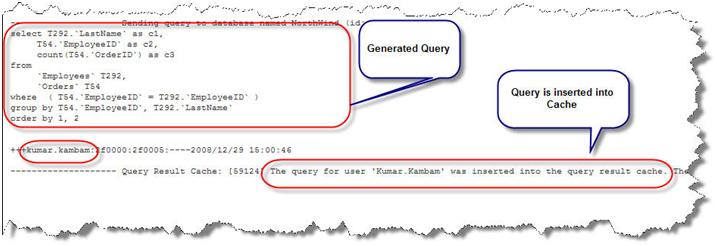
The cache is created

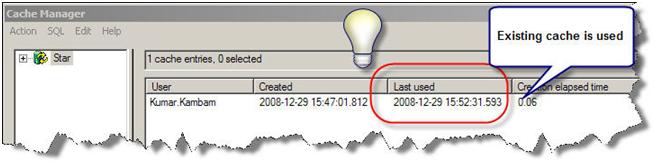
Running the same query again, the following log is generated…
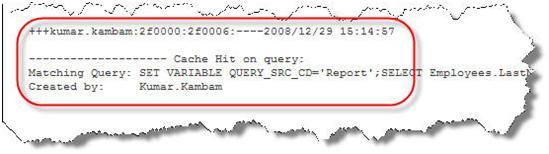
OBIEE found a matching query in the cache and uses it.
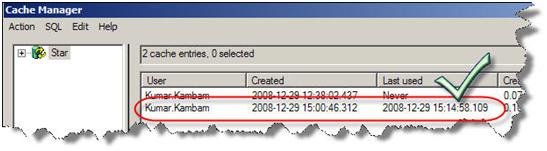
Now log on as Power User1

By running the same request, the following log is generated…
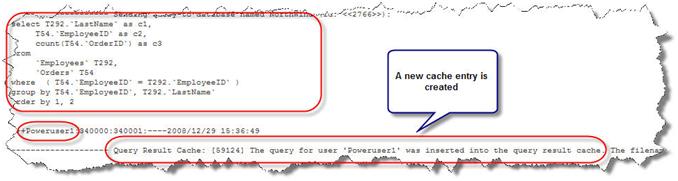
A new cache entry is created even though a similar request has been issued by a different user and a cache has been created for it
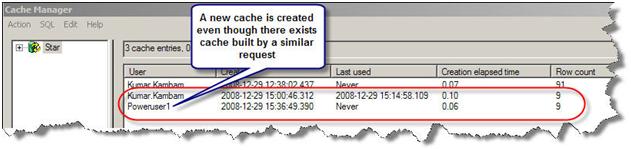
The subsequent requests by Poweruser1 that is similar to the query will hit its own cache. This ensures that a user will only see his/her data.
¶ 7:06 AM 0 Comments
OBIEE Security Enforcement – LDAP Authentication
Authentication in OBIEE
Some authentication methods used by Oracle BI server are
- Database
- LDAP
- Oracle BI server (repository users) – I do not recommend this method for medium to large implementations. It will be difficult to manage.
I will discuss on setting up LDAP in this article.
Setting up LDAP or Windows ADSI in OBIEE
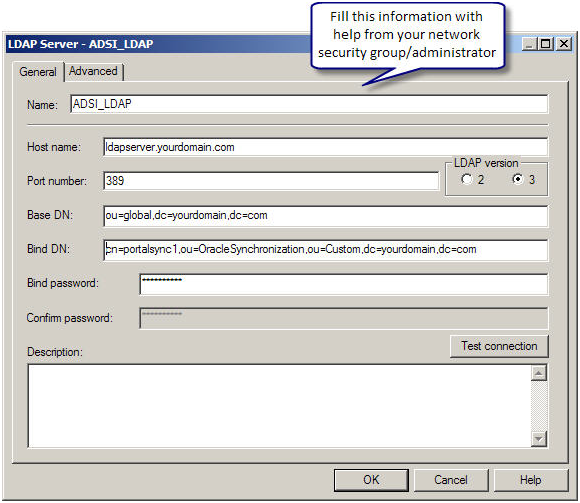
Microsoft ADSI (Active Directory Service Interface) is Microsoft version of LDAP server. Most of the steps to setup of either Microsoft ADSI or LDAP server are similar. In either case, you would need help from your network security group/admin to configure LDAP. They should provide you with the following information regarding the LDAP server
- LDAP server host name
- LDAP Server port number
- Base DN
- Bind DN
- Bind Password
- LDAP version
- Domain identifier, if any
- User name attribute type (in most cases this is default)
Registering an LDAP server in OBIEE
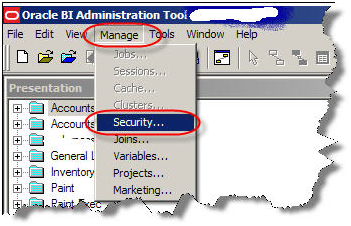
In Oracle BI repository, go to manage security.
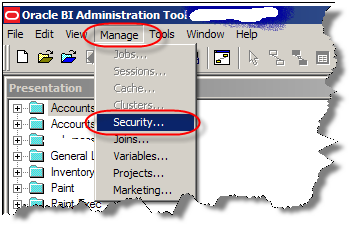
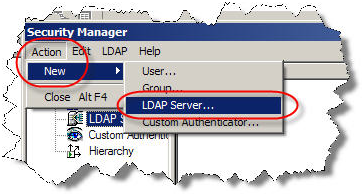
Create a new LDAP server in OBIEE Security Manager
With the help from your network security group/administration, fill out the following information
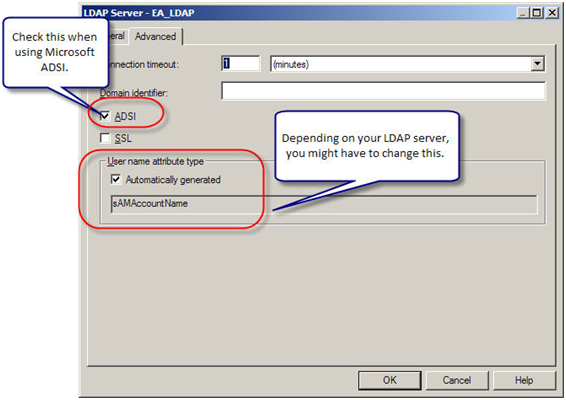
Next in the Advanced tab, based on the kind of LDAP server you have and its configuration, make the necessary changes.
For Microsoft ADSI (Active Directory Service Interface), choose ADSI and for all others leave it unchecked.
Most of the times, Username attribute would be automatically generated. For Microsoft ADSI It is sAMAccountName; for most of the LDAP servers it is uid or cn. Check with your network security group/administrator on what is the username attribute for your LDAP server. Make a note of the user name attribute you will need it later.
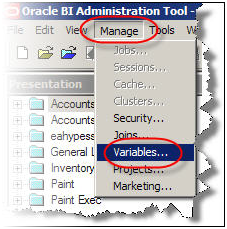
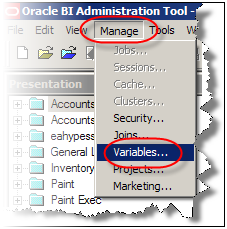
Now we need to create an Authentication initialization block. In administration tool, under Manage go to Variables.
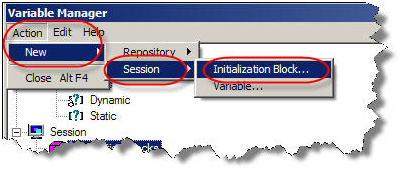
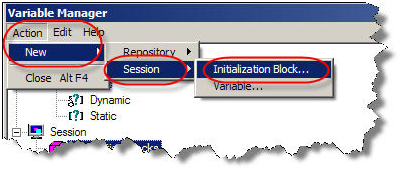
Under Action, go to New -> Session -> Initialization Block
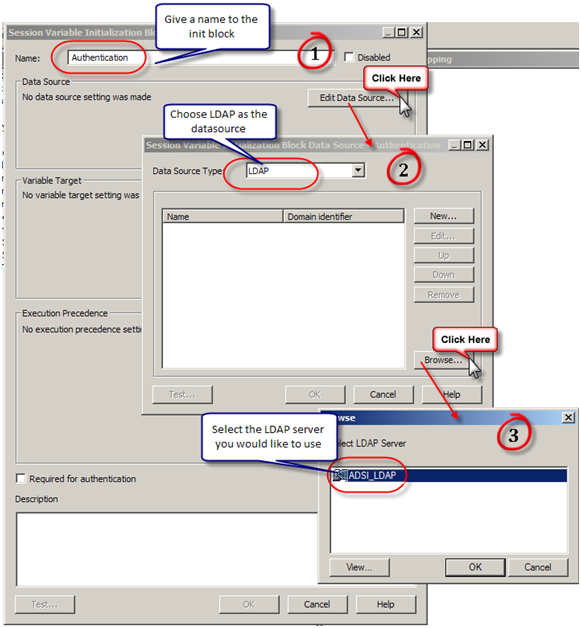
Configure the session initialization block. Give it a name and click on Edit Data Source. In the pop up window, choose LDAP from the drop down box and then click on Browse. You can also configure a LDAP server here by clicking on “New”. In the browse pop up window choose the LDAP server you would like to use.
Next we need to create variables. User and Email are the common variables normally in play.
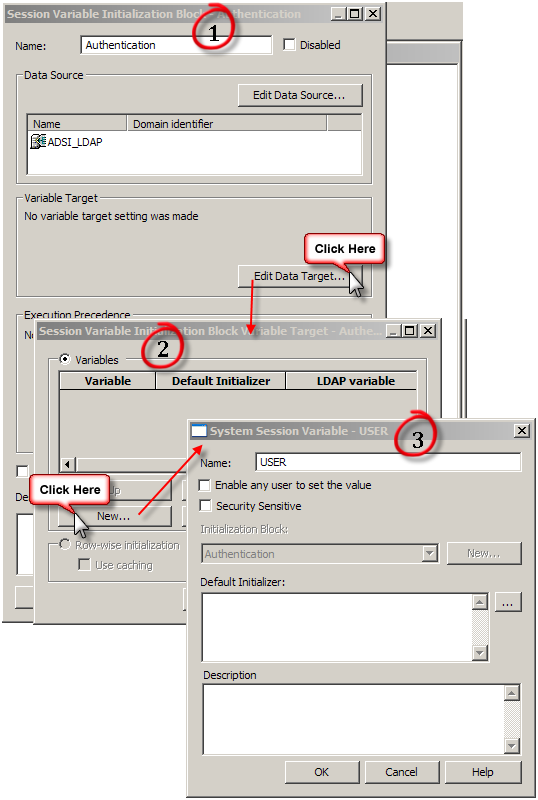
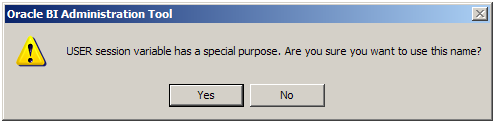
Upon clicking on OK, a warning pops up on the usage of User session variable (User session variable has a special purpose. Are you sure you want to use this name). Click yes.
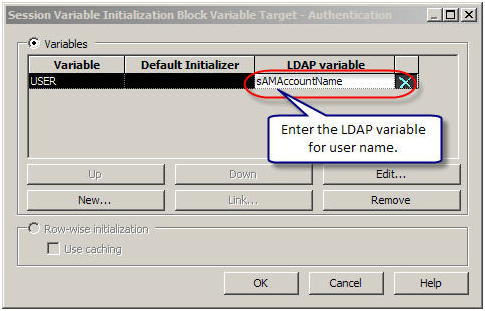
Next enter the LDAP variable for username. sAMAccountName in the case of ADSI as configured in the LDAP.
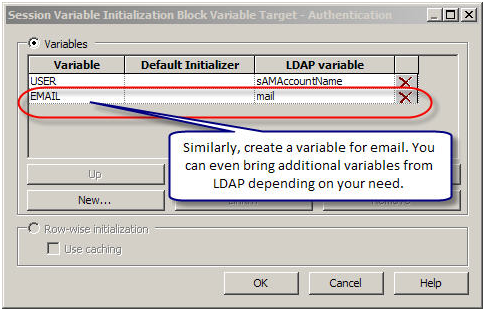
Next following similar steps create a variable for Email. In addition, depending on you need, you can bring additional variables from the LDAP server.
Now bounce your services.
OBIEE Cache is enabled, but why is the query not cached?
Repeatedly customers pose the question – OBIEE cache is enabled, but why is the query not cached? The reason why the queries are not cached can be of many reasons. Some of the reasons are:
Non-cacheable SQL function: If a request contains certain SQL functions, OBIEE will not cache the query. The functions are CURRENT_TIMESTAMP, CURRENT_DATE, CURRENT_TIME, RAND, POPULATE. OBIEE will also not cache queries that contain parameter markers.
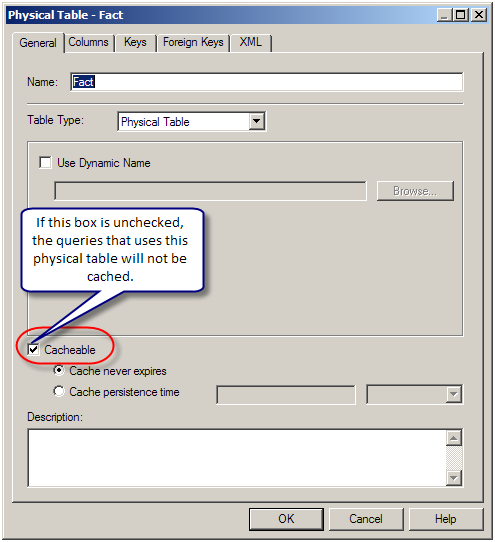
Non-cacheable Table: Physical tables in the OBIEE repository can be marked ‘non-cacheable’. If a query makes a reference to a table that has been marked as non-cacheable, then the results are not cached even if all other tables are marked as cacheable.
Query got a cache hit: In general, if the query gets a cache hit on a previously cached query, then the results of the current query are not added to the cache. Note: The only exception is the query hits that are aggregate “roll-up” hits, will be added to the cache if the nqsconfig.ini parameter POPULATE_AGGREGATE_ROLLUP_HITS has been set to Yes.
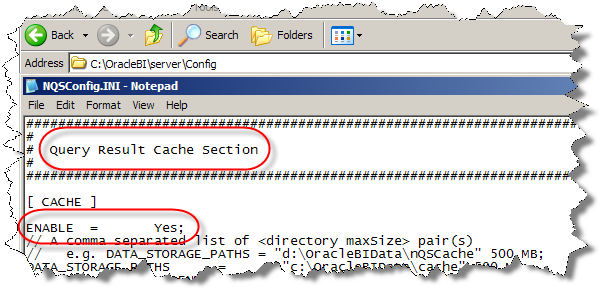
Caching is not configured: Caching is not enabled in NQSConfig.ini file.
Result set too big: The query result set may have too many rows, or may consume too many bytes. The row-count limitation is controlled by the MAX_ROWS_PER_CACHE_ENTRY nqsconfig.ini parameter. The default is 100,000 rows. The query result set max-bytes is controlled by the MAX_CACHE_ENTRY_SIZE nqsconfig.ini parameter. The default value is 1 MB. Note: the 1MB default is fairly small. Data typically becomes “bigger” when it enters OBIEE. This is primarily due to Unicode expansion of strings (a 2x or 4x multiplier). In addition to Unicode expansion, rows also get wider due to : (1) column alignment (typically double-word alignment), (2) nullable column representation, and (3) pad bytes.

Bad cache configuration: This should be rare, but if the MAX_CACHE_ENTRY_SIZE parameter is bigger than the DATA_STORAGE_PATHS specified capacity, then nothing can possibly be added to the cache.
Query execution is cancelled: If the query is cancelled from the presentation server or if a timeout has occurred, cache is not created.
OBIEE Server is clustered: Only the queries that fall under “Cache Seeding” family are propagated throughout the cluster. Other queries are stored locally. If a query is generated using OBIEE Server node 1, the cache is created on OBIEE Server node 1 and is not propagated to OBIEE Server node 2
¶ 3:27 AM 0 Comments
