OBIEE Security Enforcement – LDAP Authentication
Authentication in OBIEE
Some authentication methods used by Oracle BI server are
- Database
- LDAP
- Oracle BI server (repository users) – I do not recommend this method for medium to large implementations. It will be difficult to manage.
I will discuss on setting up LDAP in this article.
Setting up LDAP or Windows ADSI in OBIEE
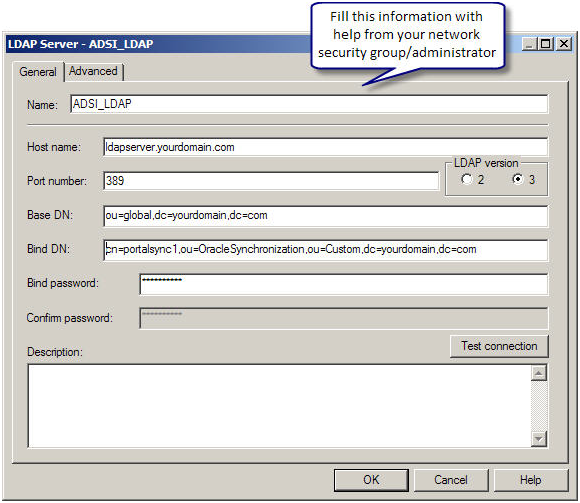
Microsoft ADSI (Active Directory Service Interface) is Microsoft version of LDAP server. Most of the steps to setup of either Microsoft ADSI or LDAP server are similar. In either case, you would need help from your network security group/admin to configure LDAP. They should provide you with the following information regarding the LDAP server
- LDAP server host name
- LDAP Server port number
- Base DN
- Bind DN
- Bind Password
- LDAP version
- Domain identifier, if any
- User name attribute type (in most cases this is default)
Registering an LDAP server in OBIEE
In Oracle BI repository, go to manage security.
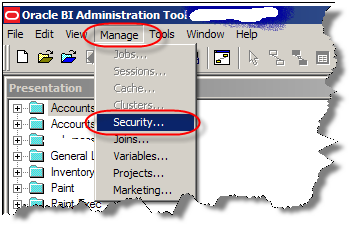
Create a new LDAP server in OBIEE Security Manager
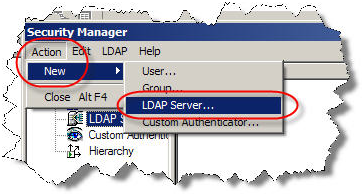
With the help from your network security group/administration, fill out the following information
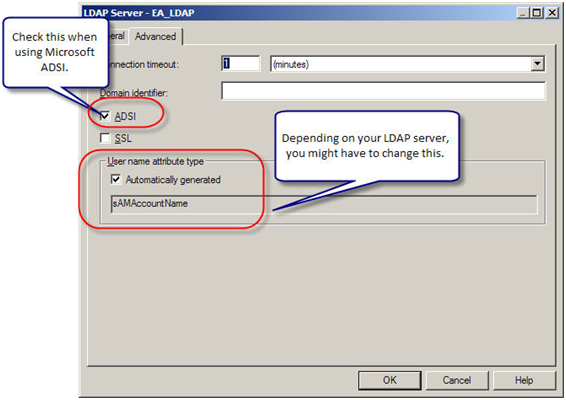
Next in the Advanced tab, based on the kind of LDAP server you have and its configuration, make the necessary changes.
For Microsoft ADSI (Active Directory Service Interface), choose ADSI and for all others leave it unchecked.
Most of the times, Username attribute would be automatically generated. For Microsoft ADSI It is sAMAccountName; for most of the LDAP servers it is uid or cn. Check with your network security group/administrator on what is the username attribute for your LDAP server. Make a note of the user name attribute you will need it later.
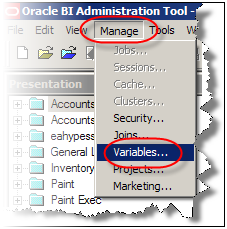
Now we need to create an Authentication initialization block. In administration tool, under Manage go to Variables.
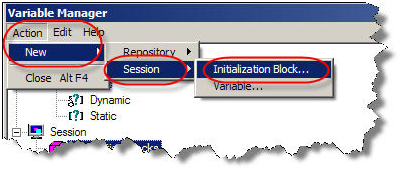
Under Action, go to New -> Session -> Initialization Block
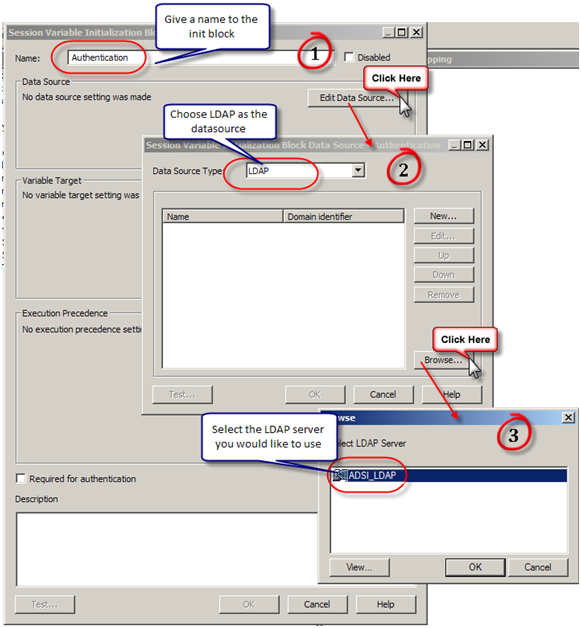
Configure the session initialization block. Give it a name and click on Edit Data Source. In the pop up window, choose LDAP from the drop down box and then click on Browse. You can also configure a LDAP server here by clicking on “New”. In the browse pop up window choose the LDAP server you would like to use.
Next we need to create variables. User and Email are the common variables normally in play.
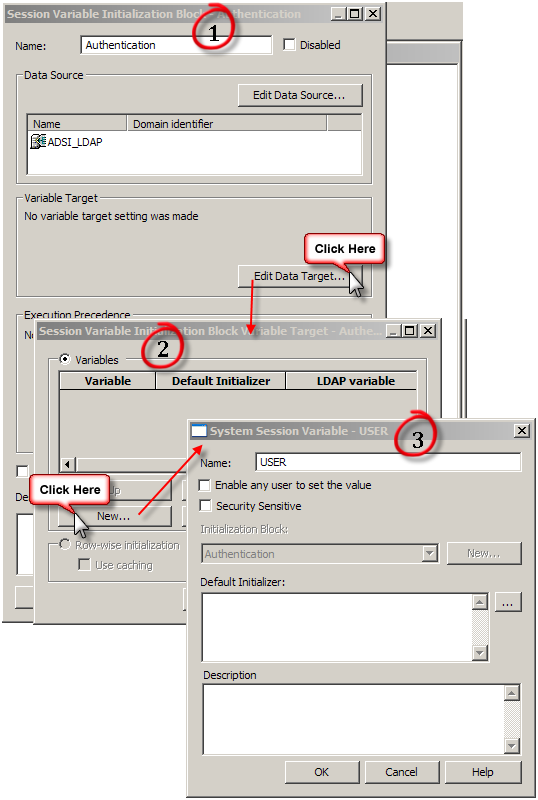
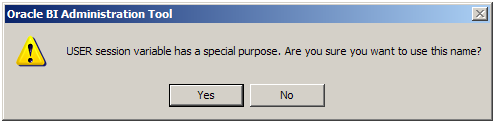
Upon clicking on OK, a warning pops up on the usage of User session variable (User session variable has a special purpose. Are you sure you want to use this name). Click yes.
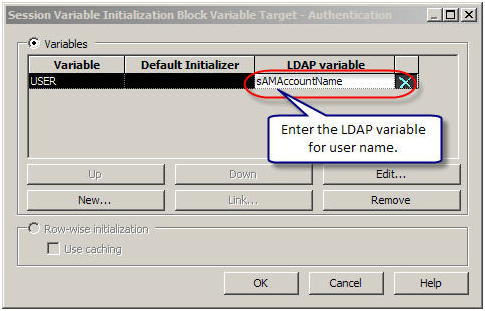
Next enter the LDAP variable for username. sAMAccountName in the case of ADSI as configured in the LDAP.
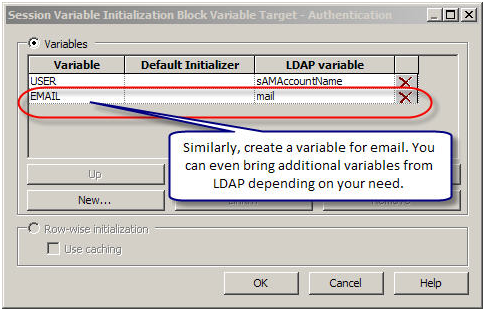
Next following similar steps create a variable for Email. In addition, depending on you need, you can bring additional variables from the LDAP server.
Now bounce your services.
OBIEE Cache is enabled, but why is the query not cached?
Repeatedly customers pose the question – OBIEE cache is enabled, but why is the query not cached? The reason why the queries are not cached can be of many reasons. Some of the reasons are:
Non-cacheable SQL function: If a request contains certain SQL functions, OBIEE will not cache the query. The functions are CURRENT_TIMESTAMP, CURRENT_DATE, CURRENT_TIME, RAND, POPULATE. OBIEE will also not cache queries that contain parameter markers.
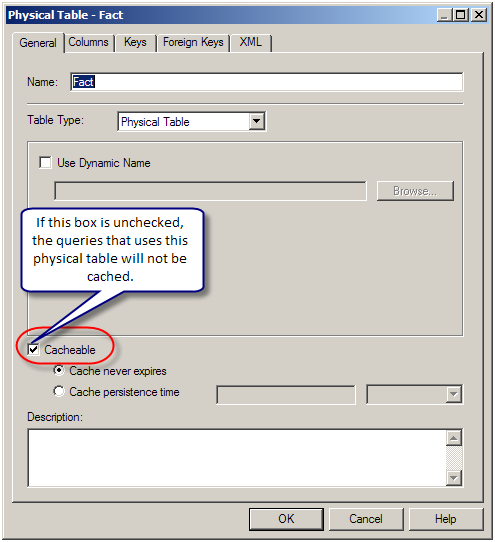
Non-cacheable Table: Physical tables in the OBIEE repository can be marked ‘non-cacheable’. If a query makes a reference to a table that has been marked as non-cacheable, then the results are not cached even if all other tables are marked as cacheable.
Query got a cache hit: In general, if the query gets a cache hit on a previously cached query, then the results of the current query are not added to the cache. Note: The only exception is the query hits that are aggregate “roll-up” hits, will be added to the cache if the nqsconfig.ini parameter POPULATE_AGGREGATE_ROLLUP_HITS has been set to Yes.
Caching is not configured: Caching is not enabled in NQSConfig.ini file.
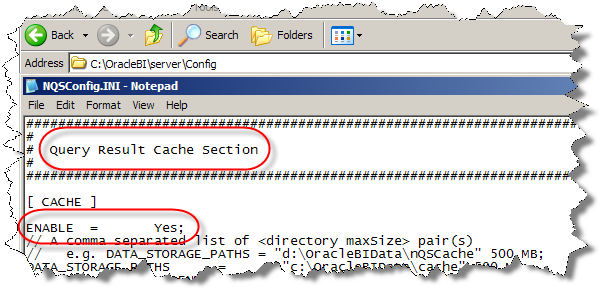
Result set too big: The query result set may have too many rows, or may consume too many bytes. The row-count limitation is controlled by the MAX_ROWS_PER_CACHE_ENTRY nqsconfig.ini parameter. The default is 100,000 rows. The query result set max-bytes is controlled by the MAX_CACHE_ENTRY_SIZE nqsconfig.ini parameter. The default value is 1 MB. Note: the 1MB default is fairly small. Data typically becomes “bigger” when it enters OBIEE. This is primarily due to Unicode expansion of strings (a 2x or 4x multiplier). In addition to Unicode expansion, rows also get wider due to : (1) column alignment (typically double-word alignment), (2) nullable column representation, and (3) pad bytes.

Bad cache configuration: This should be rare, but if the MAX_CACHE_ENTRY_SIZE parameter is bigger than the DATA_STORAGE_PATHS specified capacity, then nothing can possibly be added to the cache.
Query execution is cancelled: If the query is cancelled from the presentation server or if a timeout has occurred, cache is not created.
OBIEE Server is clustered: Only the queries that fall under “Cache Seeding” family are propagated throughout the cluster. Other queries are stored locally. If a query is generated using OBIEE Server node 1, the cache is created on OBIEE Server node 1 and is not propagated to OBIEE Server node 2
¶ 3:27 AM


Post a Comment